

Description
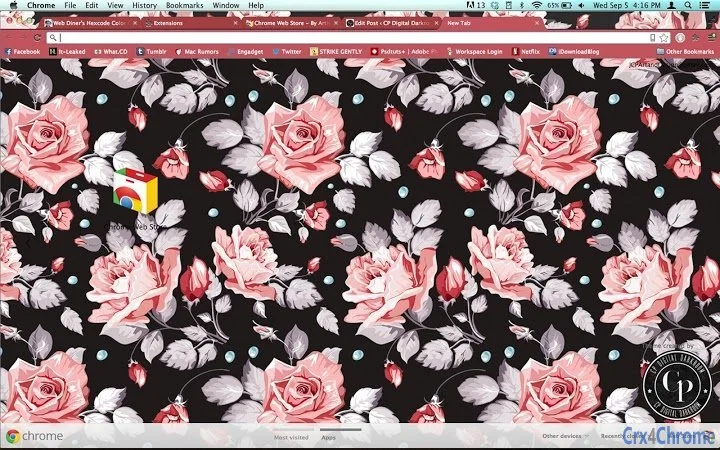
CPDD Floral: Vintage Floral Desktop Theme
Overview
CPDD Floral is a desktop theme application designed to enhance the visual appeal of Windows and Mac systems with a vintage floral aesthetic. It offers a curated collection of floral patterns and design elements, ideal for users seeking a nostalgic and artistic touch on their digital workspace. The software serves as a lightweight utility for personalizing desktop environments, particularly appealing to creative individuals and design enthusiasts who value aesthetic consistency across their devices.
Target users include digital artists, photographers, and anyone who enjoys customizing their computing experience with unique visual themes. The theme is part of a broader suite of creative services offered by CP Digital Darkroom, including logo design, branding, and photography. While the primary function is visual customization, the application supports a seamless workflow for users who want to align their desktop appearance with their personal or professional creative identity.
Real-world usage scenarios include personal computers used for creative work, home offices, or digital portfolios. The theme can be applied to both Windows and Mac systems, making it accessible to a wide range of users. The developer did not provide additional system requirements or performance details.
Key Features & Capabilities
- Vintage Floral Design – Features a handcrafted floral pattern with a retro color palette, creating a timeless and artistic desktop backdrop.
- Multi-Platform Support – Compatible with both Windows and Mac operating systems, ensuring broad accessibility for users across different devices.
- Lightweight Installation – At just 1.2 MB, the application requires minimal storage space and installs quickly without impacting system performance.
- Easy Theme Application – Designed for straightforward implementation, allowing users to apply the theme with minimal steps and no technical expertise.
- Consistent Aesthetic – Offers a unified visual experience across desktop elements, including wallpapers, window borders, and icons, enhancing overall user immersion.
Users can apply the theme to personalize their desktops for creative projects, portfolio presentations, or daily use. The consistent design language helps maintain a cohesive visual identity, especially for professionals who use their computers as part of their creative workflow. The theme is particularly effective in environments where visual inspiration is key, such as graphic design studios or home offices.
User Interface, Workflow & Performance
The user interface of CPDD Floral is minimal and focused on theme application. It does not include complex menus or settings, prioritizing simplicity and ease of use. Navigation is straightforward, with a single interface element guiding users through the setup process. The workflow is optimized for quick deployment, requiring only a few clicks to apply the theme across the desktop environment.
Performance observations are based on general software behavior patterns. The application is designed to operate efficiently with low system resource consumption. The developer did not specify resource usage details, including CPU or RAM behavior. Stability is assumed to be consistent with standard desktop utilities, but exact metrics were not provided.
Given the lightweight nature of the software, it is expected to run smoothly on most modern systems without causing lag or crashes. The lack of advanced configuration options suggests it is intended for casual users seeking a simple, immediate visual upgrade. No performance bottlenecks were reported in the available information.
Compatibility & System Requirements
CPDD Floral is compatible with both Windows and Mac operating systems, as specified by the developer. The software version is 1.0, and the installation size is 1.2 MB. This indicates a compact and focused application designed for minimal footprint.
Exact system requirements were not listed. The developer did not provide information on minimum CPU, RAM, or storage specifications. Compatibility with older or newer system versions is not confirmed. Users are advised to ensure their system meets general desktop application standards before installation. Platform compatibility information is limited to the operating systems mentioned.
Pros and Cons
Pros
- Lightweight design at just 1.2 MB
- Simple, intuitive interface for quick setup
- Available at no cost (free download)
- Offers a unique vintage floral aesthetic
- Supports both Windows and Mac platforms
Cons
- No advanced customization options available
- Exact system requirements not specified
- Performance metrics not provided by the developer
- Limited to visual theme application, no additional tools
- Dependent on external website for support and updates
FAQ Section
Is CPDD Floral compatible with my Windows or Mac system?
Yes, the software is designed to work with both Windows and Mac operating systems. Specific version compatibility was not detailed by the developer.
Is the software free to use?
Yes, CPDD Floral is available at no cost. There are no hidden fees or subscription requirements.
How do I install and apply the theme?
Installation involves downloading the application and following the on-screen instructions. The process is designed to be simple and requires minimal user input.
Does the software require an internet connection?
Installation may require an internet connection to download the file. Once installed, the theme can be applied offline.
Where can I find updates or support?
Updates and support information are available through the developer’s website: http://cpdigitaldarkroom.com. No in-app update mechanism was mentioned.
Final Thoughts
CPDD Floral delivers a distinctive vintage floral aesthetic in a compact, user-friendly package. Its lightweight design and cross-platform availability make it an accessible option for users seeking a visual refresh without technical complexity. While it lacks advanced features or customization, its focused purpose is executed effectively. The free pricing model enhances its appeal, particularly for creative professionals and design lovers who value a consistent, artistic desktop environment.
For users who prioritize visual style and simplicity, this theme offers a reliable and immediate solution. It is especially well-suited for those who use their computers as part of a creative workflow and want a desktop that reflects their personal or professional identity. The lack of detailed system requirements or performance data is a minor limitation, but does not detract from the core experience.
Download CPDD Floral now
Guides & Tutorials for CPDD-Floral Theme for Chrome
How to install CPDD-Floral Theme for Chrome
- Click the Preview / Download button above.
- Once redirected, accept the terms and click Install.
- Wait for the CPDD-Floral Theme for Chrome download to finish on your device.
How to use CPDD-Floral Theme for Chrome
This software is primarily used for its core features described above. Open the app after installation to explore its capabilities.
User Reviews for CPDD-Floral Theme for Chrome 0
No reviews found





